Disable Error Reporting on Windows XP and Windows Server
2003
Error Reporting, Windows XP, Server 2003, computer maintence and LVIT.
By F. Leonard
When I come across a client who is having problems, they tell
me they have submitted the error a number of times but no-one has ever contacted
them. I believe the error reports go
into a black hole at Microsoft and never get looked at. When an error report is being generated, most
of your system resources are being used and your system will slow down.
The Fix is Turn off Error Reporting.
Right Click on My Computer and Left click on Properties:
Then Click on the Advanced Tab:
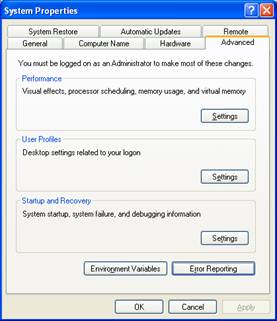
At the bottom click on Error Reporting:
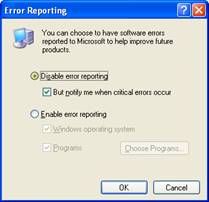
Click on Disable Error Reporting, Then Click OK, then OK
again. Done
Let us do all your computer maintenance service and see how well your computers perform throughout the years!
To be continued... Select link below for more computer IT articles on-
Virus protection, internet security software, personal computer updates, hacker protection and anti-virus downloads.
updated 10-27-2008
http://lvitweb.com/computer-articles-computer-virus-software.html
|



